MyObservatory Overview

Transforming a Public Weather Platform Into an Actionable, Citizen-Focused Experience
‍

MyObservatory is one of Hong Kong’s most widely used public weather platforms, serving millions of residents who rely on it for real-time, location-specific decision making.
‍
My role: Led research, problem definition, interaction design, and iterative prototyping. I partnered with product, engineering, and meteorology teams to reframe the homepage around real user behaviors and reduce friction in accessing time-sensitive information.

  1. 🧒 Role

    UI/UX Designer

  2. πŸ™Œ Collaborator

    Product Owner, Developers

  3. πŸ—“οΈ Date

    2021

Stakeholder request

β€œRedesign the homepage to give users faster access to rainfall products.”

I expanded this narrowly scoped ask into a more strategic opportunity:
improving how citizens interpret weather information and make decisions in high-stakes moments.

Problem

Many residents rely on MyObservatory for real-time weather alerts, but critical information (rainfall warnings, lightning alerts, favourite locations) was buried behind menus or masked by low-contrast UI β€” causing missed warnings and frustration, especially during urgent weather events.

Outcome

The redesign delivered a clean, high-visibility dashboard that surfaces urgent warnings and essential weather data at a glance. The new design system created reusable patterns, reducing future development overhead and enabling quicker rollout of new features.

My Contribution

I led user research, behavioral analysis, and decision-focused design. By uncovering three key behavioral pain points, I refocused the product scope on usability rather than feature proliferation β€” avoiding expensive but low-value forecasting widgets and instead prioritizing fast access to key info, legibility, and consistency.
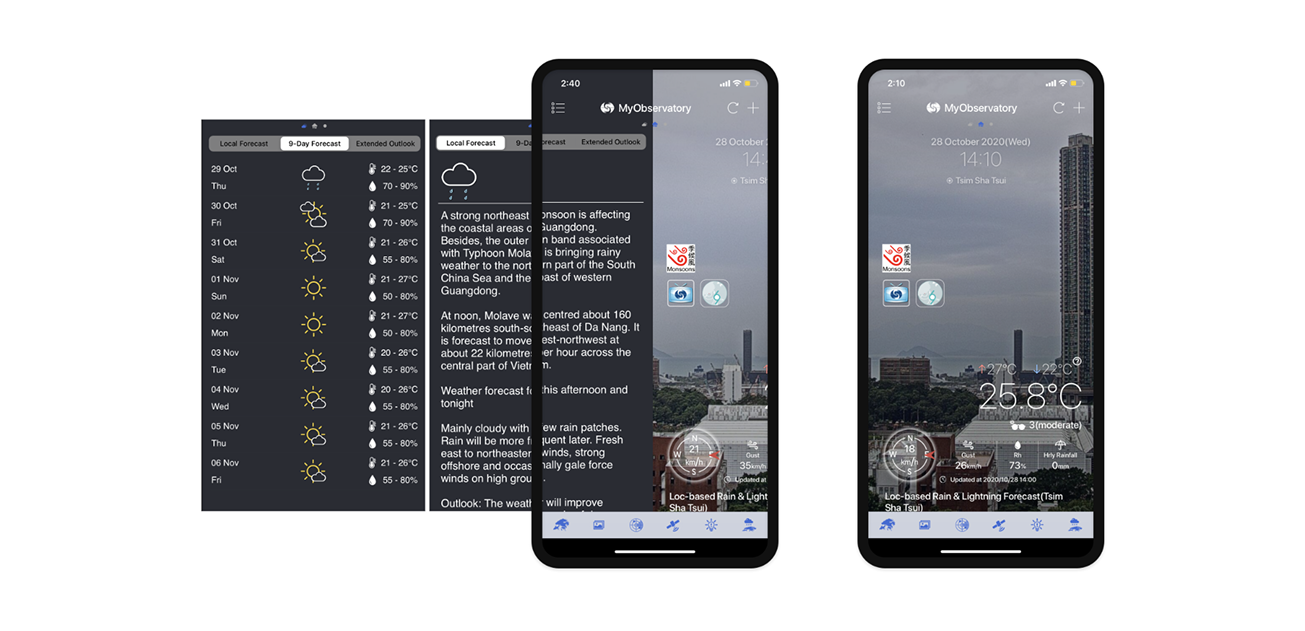
Figure 1: MyObservatory mobile app's original design, hard to scan

Through interviews, usage analysis, and contextual inquiry, I uncovered three behavioral patterns that revealed why users were struggling:

🌀 Buried or disappearing essentials
Critical information (9-Day Forecast, lightning alerts, favourite locations) was hidden or inconsistent, reducing user trust and safety in urgent conditions.
‍
🌀 Feature overload
Many tools were designed for expert meteorologists, not everyday citizens. This created noise and slowed comprehension.
‍
🌀 Low visual legibility
Photo backgrounds and light text weakened contrast, especially in bright outdoor conditions, making critical updates easy to miss.

These patterns prevented the team from investing in complex forecasting widgets that wouldn’t solve the real problem: helping people understand what action they should take next.

From Insights to Jobs-to-Be-Done

The behaviors were translated into JTBD that aligned product, engineering, and meteorology teams:
‍
1. Journey / Daily Planning
When I’m planning my day or deciding whether to travel,
I want to quickly understand what the weather means for my immediate plans,
so I can make informed decisions (go, delay, cancel, prepare) without digging through complex data.

2. Responding to Warnings / Severe Weather
When a weather warning is issued,
I want clear, trustworthy, and easy-to-verify information,
so I can respond confidently and take the right actions to stay safe.

UX design principles

Based on stakeholder requirements and user interview insights, I created a set of simple design principles to guide decisions and keep both the team and stakeholders aligned.

Figure 2: Design principles illustration

Wireframe

After gathering stakeholder requirements and user interview insights, I created wireframes to visualize solutions and collect stakeholder feedback.

Figure 3: Wireframe feedback from stakeholders, compiled into presentation slides for documentation purposes.

Stakeholder Feedback
‍
🌀 Expected a few additional forecasting widgets.
🌀 Requested the chatbot remain always visible.
🌀 Preferred using real-time location photos instead of illustrations.

Prototyping & Testing

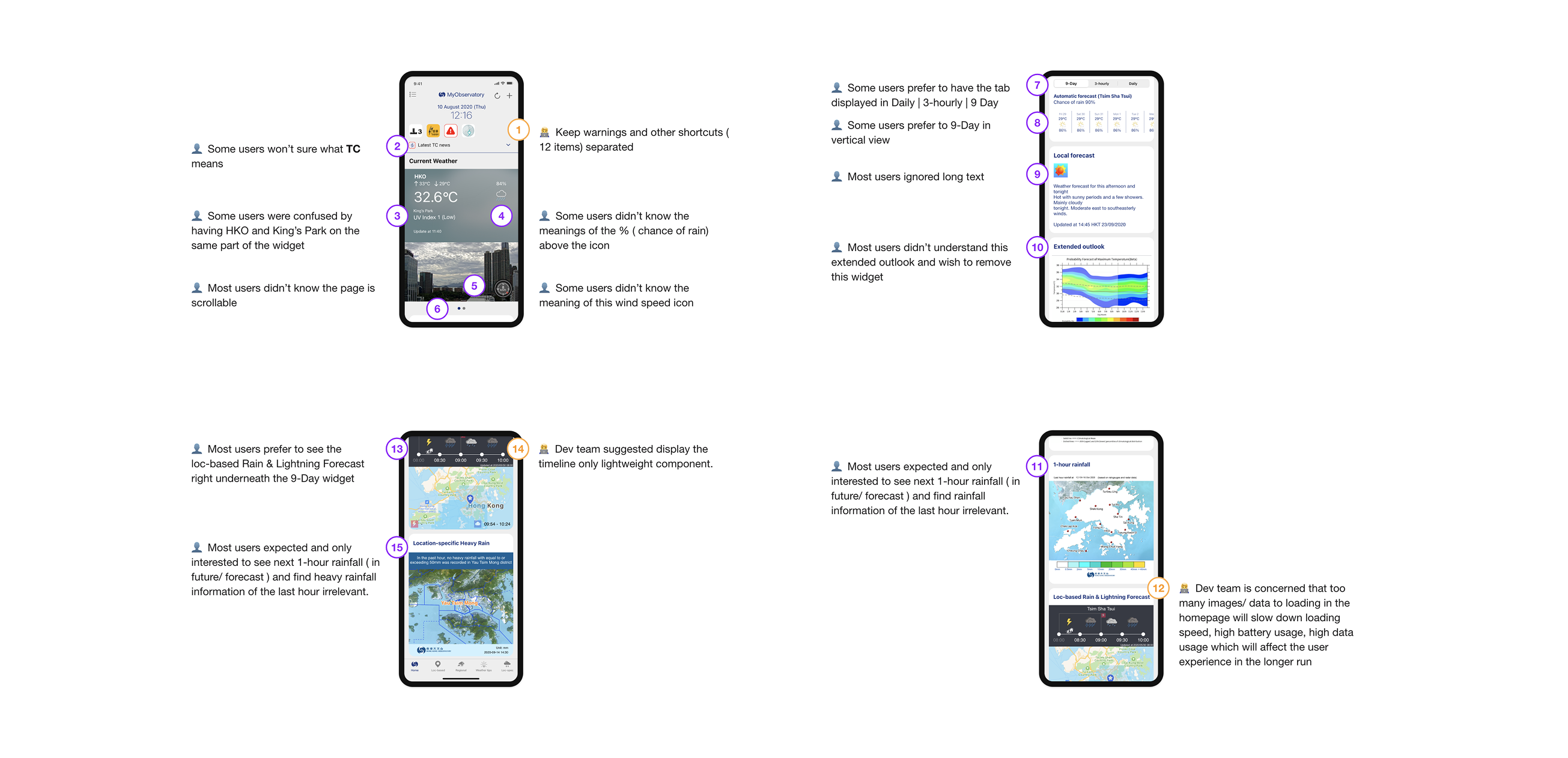
I created a clickable prototype and ran iterative usability tests and design review session with developers. Key learnings included:

Figure 4: Prototype feedback from users, compiled into presentation slides for documentation purposes

User feedback
πŸ‘€ Some weather terms were too technical
πŸ‘€ Many didn’t realize they could swipe horizontally in the old UI
πŸ‘€ Users wanted quicker access to warnings and rainfall

Dev team feedback
πŸ’» Concern about mixing the warnings and other shortcuts together
πŸ’» Concern that displaying too many images/ data will effect the app performances.

Design System Foundations

I documented foundational patterns including typography scale, contrast rules, iconography, component behaviors, and responsive layout principles.This improved consistency and provided a reusable structure for future features β€” something the team previously lacked.

Figure 5: Initial exploration of the design system foundation

Final

The redesigned homepage delivered:
🌀 A cleaner, more legible dashboard for quick scanning
🌀 Consistent warning hierarchy to support public safety
🌀 More accessible rainfall and environmental data
🌀 Simplified switching between locations, reducing navigation friction
‍
Overall, the experience made complex environmental information more approachable and actionable, helping citizens make faster, safer decisions in daily life and during severe weather events.