Designathon Generative UI Overview

Project: A one-day hackathon project exploring generative UI: an interface that turns a fitness goal into a small, adaptive plan, then reshapes that plan based on what the person actually does with it, rather than shipping one fixed flow to everyone.

  1. 🧒 Role

    Designer

  2. πŸ™Œ Collaborator

    Solo (1-day hackathon)

  3. πŸ—“οΈ Date

    2026

Before the hackathon research

I joined a one-day hackathon mainly to understand what β€œGenerative UI” actually means beyond the buzzword. Rather than trying to fully understand the technology first, I wanted to learn by exploring and building.

Baseline

Today's model:
‍
user β†’ predefined interface β†’ predefined flow β†’ result.

‍Generative UI model:
user intent β†’ system understands context β†’ interface/workflow adapts β†’ result.

The key shift: designing for how an interface adapts, not just what it looks like.

Existing examples

A few different flavours:

Building the product:
Figma Make - prompt β†’ generated functional UI/app
‍Lovable - natural language β†’ functional app β†’ iterate through prompts
‍
Creating a dynamic experience within a product:
‍ThoughtSpot - question/intent β†’ generated analysis or visualisation

When creating a dynamic experience within a product, there are five opportunity areas:

Entrance β€” how does intent enter? Text, voice, image, behaviour, context.
‍Understanding β€” what does the system think I mean? Intent + context + user needs.
‍Preference β€” how should I experience it? Visual vs text vs voice, simple vs detailed.
‍Generation β€” what experience should appear? AI composes the interface from the brand's design system and components.
‍Control β€” how do we keep it accurate? Data + rules + design system + AI.

The manifesto

The hackathon opened with a manifesto that shaped how I thought about the project.

A few positions stuck with me:
Static is a tool limit, not a law
We designed identical screens for everyone because our tools could only draw one. That constraint is changing.

The UI should learn the user
An interface can reshape itself around a person's context and intent instead of asking the person to adapt to fixed software.

Generation needs judgement
A UI that changes without purpose is just noise. Every change has to earn its place by being clearer, faster or more useful than what came before.

Constraints are the genome
You're not just designing individual screens.
‍
You're designing the rules and guardrails that generate them. The brief gave me a few concrete requirements to keep coming back to:
Show at least two distinct generations of the same UI
Keep the human in control of adaptation
Make adaptation a proposal, not a trap
‍
Be transparent about what is mocked or hard-coded versus what is real

The problem

Save β‰  Act
I save exercise Reels because I want to try them but saving doesn't guarantee I'll act.
‍
The problem isn't a lack of fitness content. It's the gap between:
β€β€œI want to do this.”
‍
and
β€β€œI actually did it.”
‍
‍
I wondered:
‍Could a UI turn that existing intention into a small, achievable action β€” and then learn what helps me follow through?
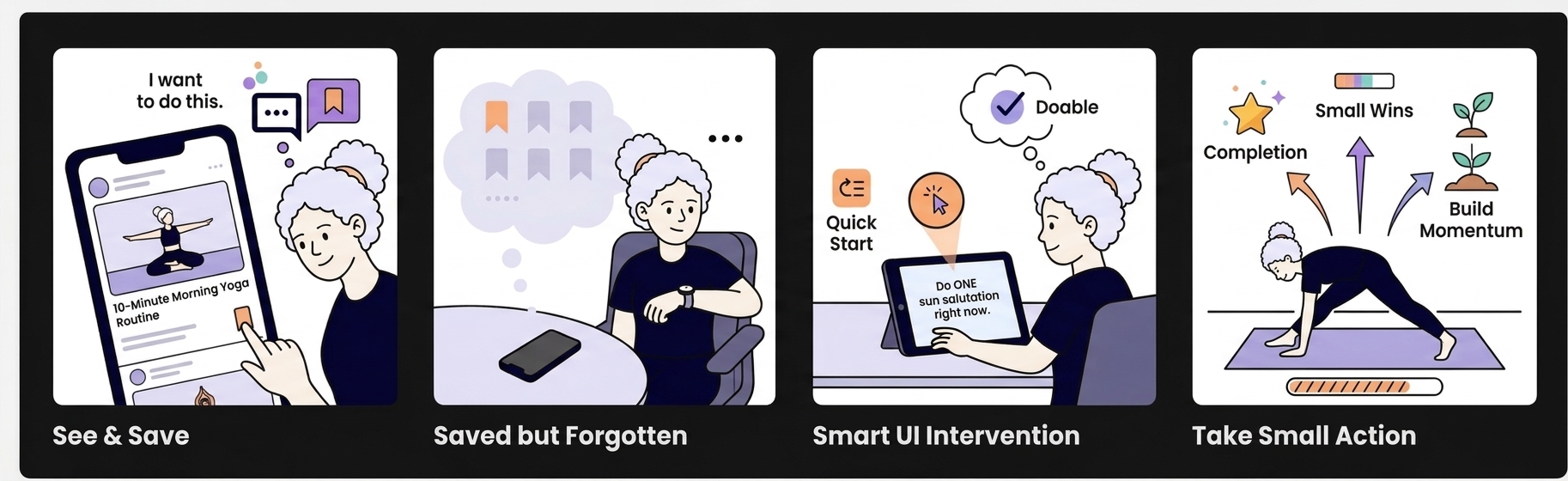
Figure 1: Storyboard of the problem and potential solution

Exploring the ideas

I sketched three directions before deciding what was worth building.

Idea 01: Save a Reel β†’ Generate a Workout Video

Input: Saved Reel (some Reels contain multiple exercises, others just one)
System: Understands the exercise/content β†’ generates a complete workout
Output: A personalised workout video

GenUI question: Can a saved piece of inspiration become a generated experience rather than just saved content?
‍What it explores: Generative content + UI.
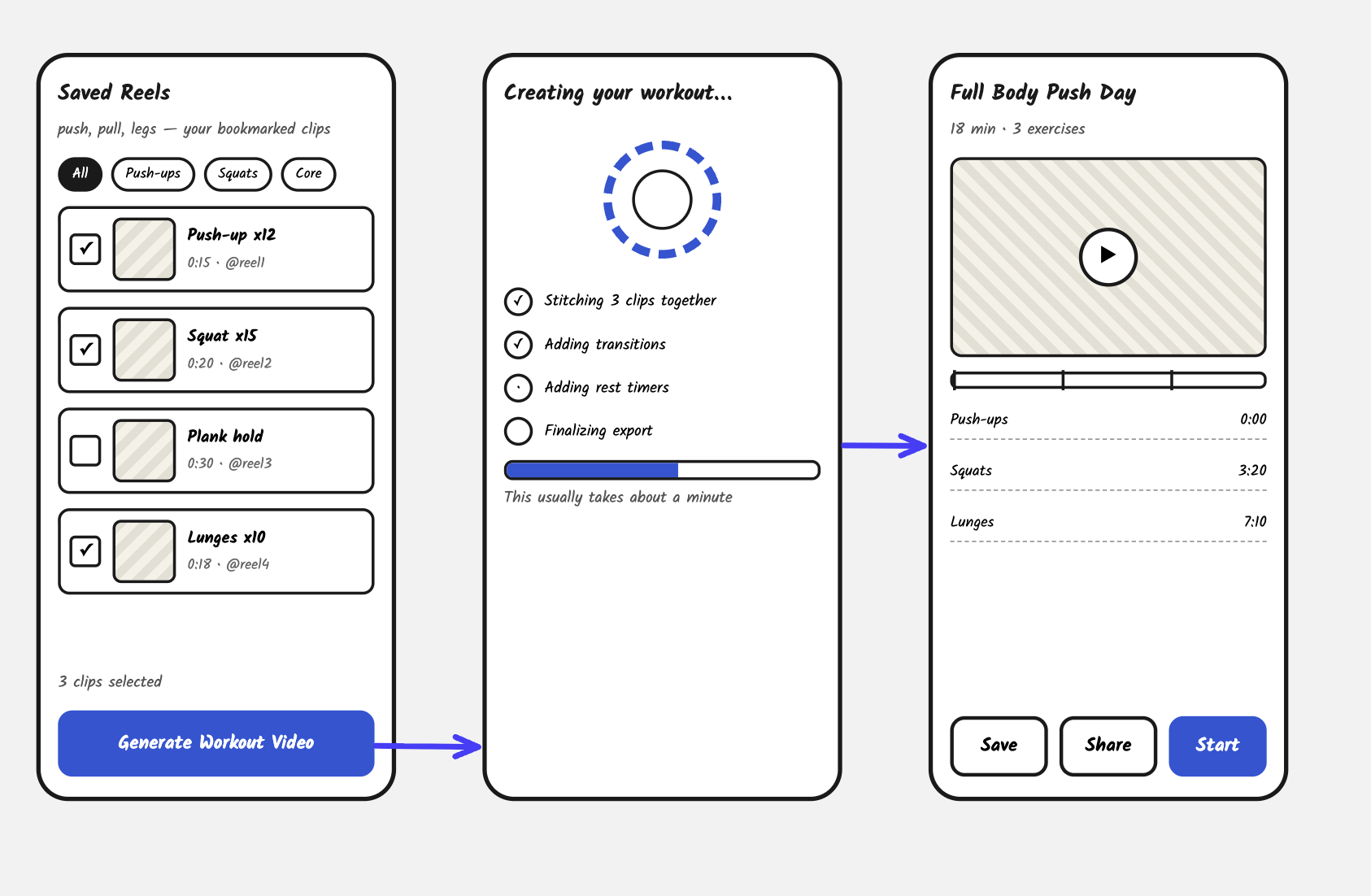
Figure 2: Idea 1 save a reel to generate a full lenghth workout video

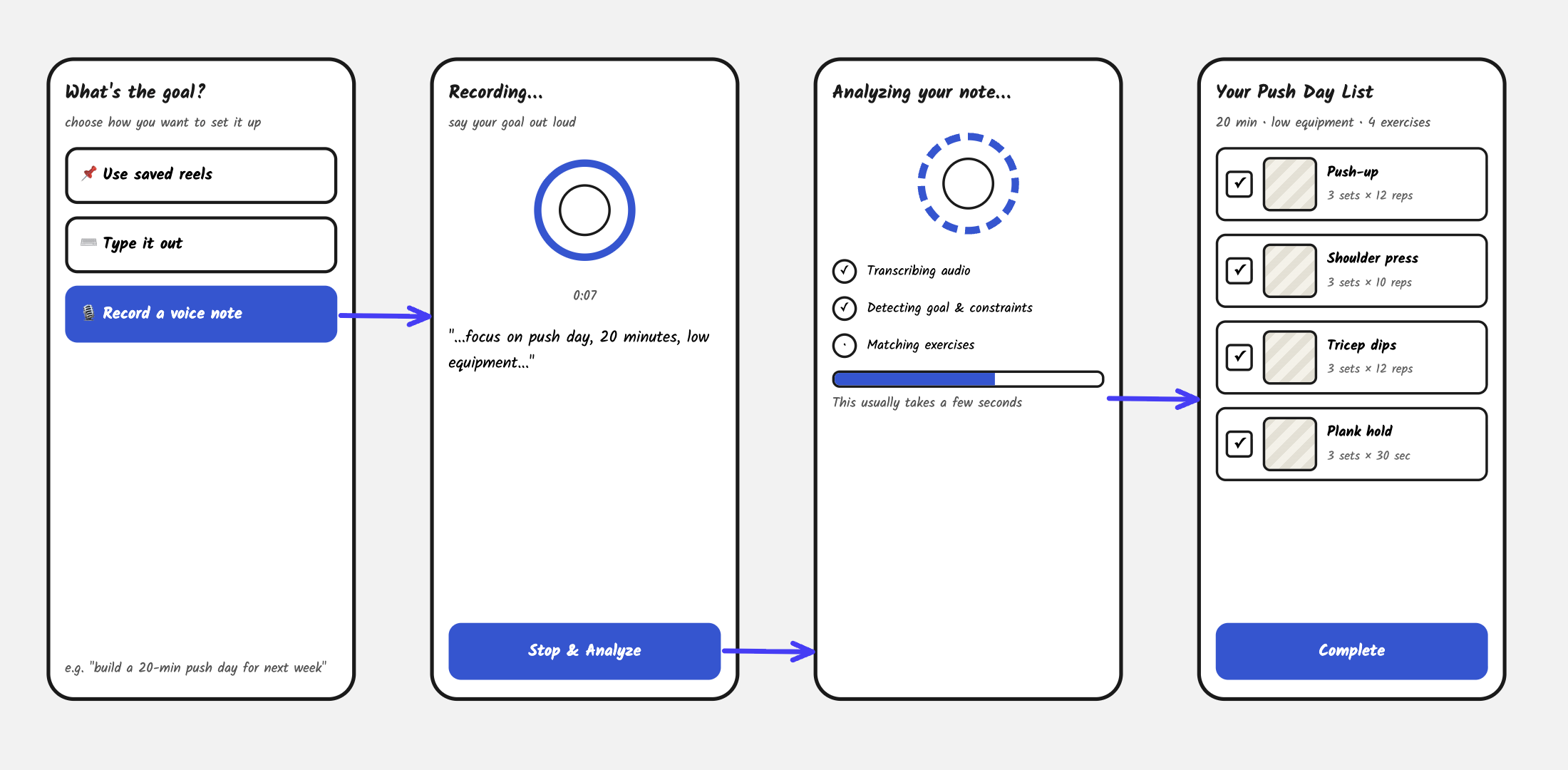
Idea 02 β€” Goal β†’ Voice Note β†’ Analyse β†’ Generate Plan

Input: β€œI want to be able to do 8 pull-ups.”
‍System: Analyses the goal, potentially context/preferences β†’ generates a structured plan
‍Output: A personalised list

GenUI question: What happens when the interface is generated from intent rather than from a predefined flow?
‍What it explores: intent β†’ interpretation β†’ generated interface/content.

Figure 3: Idea 2 Set goal via voice note to generate a workout plan

Idea 03 β€” Form Corrector

Input: Voice note / exercise selection
‍System: Sets up camera β†’ observes movement β†’ analyses form
‍Output: Live audio guidance
‍
For example:β€œKeep your chest up.”
β€œSlow down the descent.”
β€œYou’re shifting your weight to the left.”

‍GenUI question:Can the interface adapt itself in real time to what the person is doing?
‍What it explores: real-time contextual adaptation rather than just one-time generation.
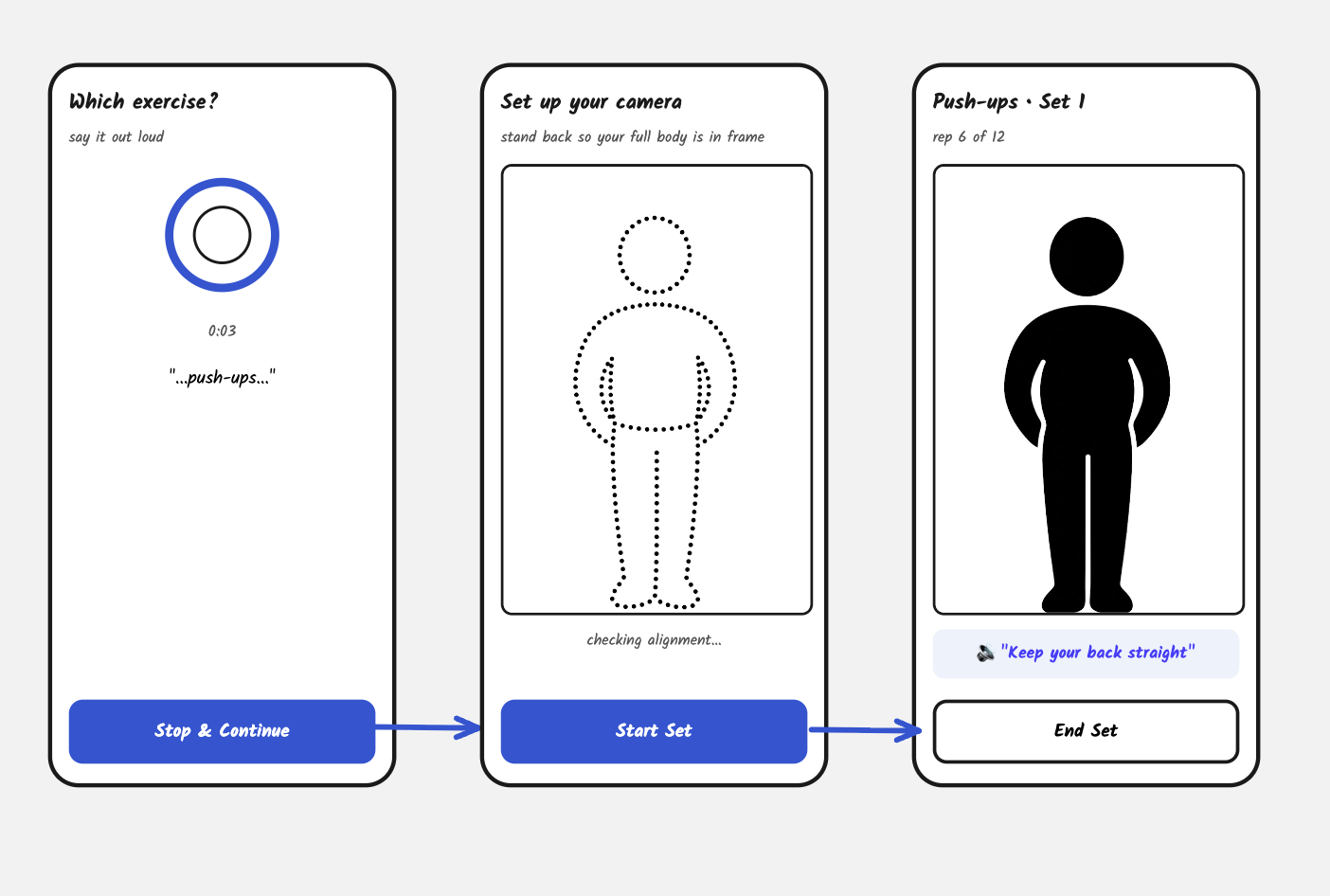
Figure 4: Set up phone for voice form correction feedback.

Further idea exploration

Reels are just one way that intention shows up the actual gap (want to do it β†’ actually did it) doesn't depend on Reels specifically, so I let the input move to a typed goal for idea 2.

Idea 2 is probably the strongest hackathon concept because it directly connects to:
intent + context β†’ generated experience β†’ feedback β†’ adaptation.

Scoping down from the multi-modal version, I focused the concept on one clear path: mini fitness goals only β€” input a mini exercise goal β†’ generate progression steps to complete it.

Final prototype

Type a mini goal into the chat ("I want to do 8 pull-ups") and the interface parses it and proposes a small, structured progression plan β€” a warm-up, then sets scaled up to the goal number. Nothing is added until you tap to accept it, so the generation is always a proposal, not something sprung on you.
‍
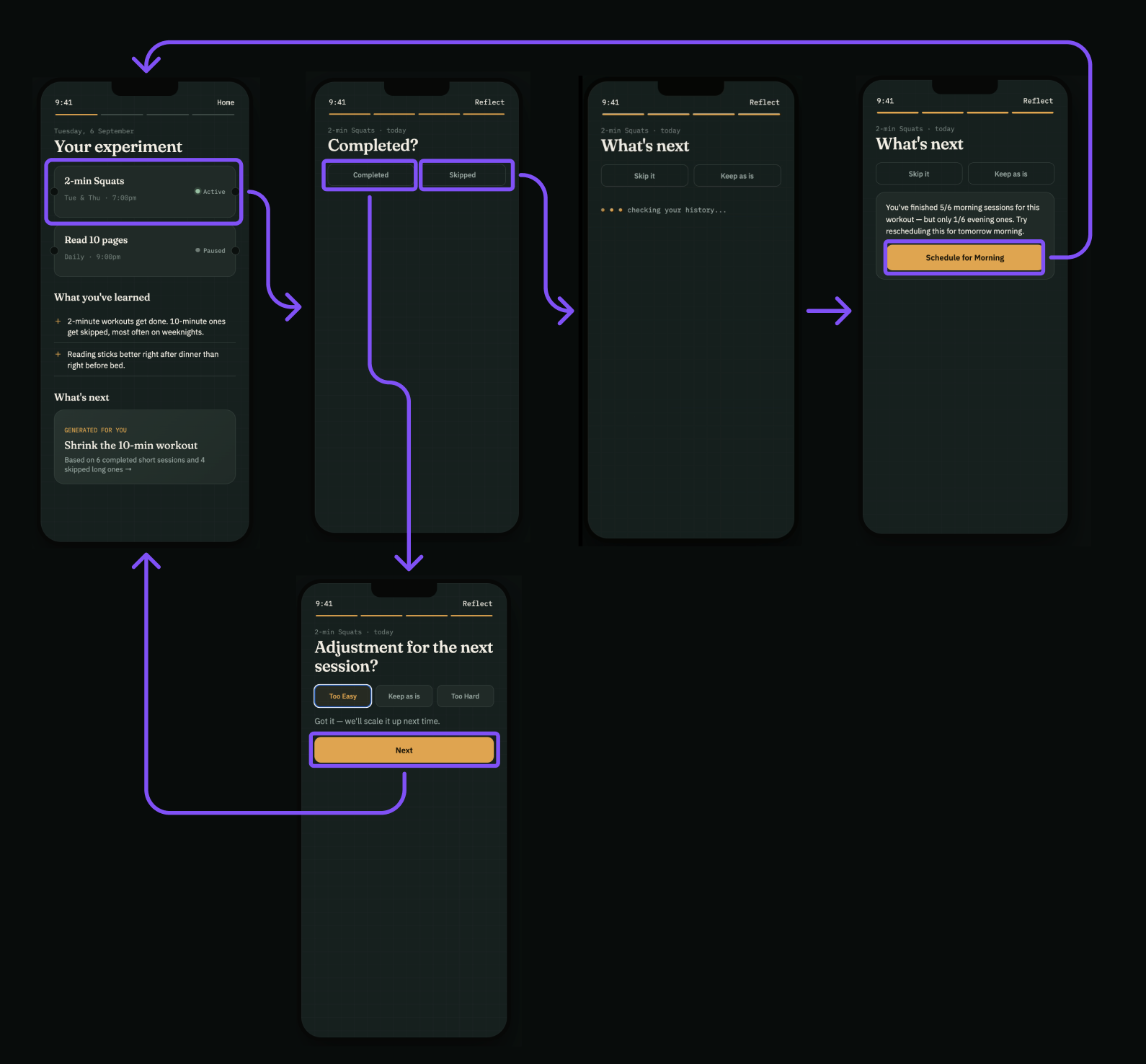
From there, the plan lives on the home screen as a checklist. Check off a task or two and a subtle "call it a day" button appears β€” tap it, and the interface confirms it'll ease tomorrow's plan back, without waiting for the whole thing to be finished or failed.

Finish everything instead, and it asks how it felt, with three real outcomes: too much, keep as is, or push harder.

For the next session, submitting 'too much' would adjust the next plan toward an easier progression like supported pull-ups instead of a full pull-up. (This logic is designed but not wired into the live prototype.)

Figure 5: Interactive prototype of the final design of MiniGoal.

What I learned

β€πŸ‘‰ Learned a practical workflow for exploring AI-driven products.
πŸ‘‰ Generative UI pattern: Generate β†’ Act β†’ Learn β†’ Adapt.
πŸ‘‰ Shifted from designing static screens to designing rules for how the experience can change.

This was a one-day hackathon, so there was no formal user-testing or feedback round.

Informally, several participants recognised the same β€œsave but never act” pattern in their own lives. It was a useful signal, but not enough to validate the problem or MiniGoal's approach.

If I took this further, I'd first want to understand why people don't act on saved intentions and what helps them follow through. Next, I’d want to continue building MiniGoal and use it myself to test the hypothesis in practice, before validating it with others.